Hero / Value Proposition
Most people open an AI chat, type a prompt, take the output, patch what breaks, then repeat the same discovery from zero on the next session. Requirements drift, context disappears, and the AI says “done” without proof. AI Engineering OS is the fix: an engineering system that gives any AI model rules, a lifecycle, checklists, baselines, and verification, so work follows an engineering process instead of a guessing game. It is a structured AI engineering methodology for AI-assisted software and digital-product development, built to work across AI models and AI development environments.
What Is AI Engineering OS?
AI Engineering OS is a documentation and knowledge product: an AI engineering methodology that sits between you and your AI model. The model still does the actual work; AI Engineering OS makes sure that work follows an engineering process instead of an open-ended chat.
The product is built around three core governance files:
– AGENTS.md (2,121 lines): who the AI is, how it behaves, how it decides, and what it may not do.
– MASTER_RULEBOOK.md (26,286 lines): the 10 engineering standards the AI follows in every discipline.
– CHECKLISTS.md (6,037 lines): 42 executable checklists the AI runs and reports against.
Around those sit 24 ready-to-use prompts, 15 workflows, 12 worked examples, 7 platform guides, and full customer documentation. The package adds up to roughly 34,400 lines across 80 files.
“Operating system” is a product-layer metaphor, not a computer-science claim. AI Engineering OS is the engineering layer that runs around any AI model, the way an operating system runs around hardware. The model can change from one project to the next; the engineering methodology underneath stays the same.
What Does “AI Engineering Methodology” Mean Here?
A repeatable engineering process: a defined lifecycle, engineering disciplines, checklists, evidence-based quality gates, baselines, an audit trail, and verification. These pieces sit between you and any AI model so the model’s output follows engineering discipline instead of open-ended chat. This system is what you are buying: not a single prompt, but the engineering process that makes AI-assisted development consistent, documented, and verifiable.
The Problem With Unstructured AI Prompting
Raw prompting is conversational, not engineered. A chat interface is excellent for answers and weak at running a project. Projects have stages, dependencies, and acceptance criteria; chats have context windows.
The predictable failures of prompting without a methodology: context loss when a session ends or the model switches, scope creep when requirements never get frozen, no definition of done, no quality bar, no documentation, and no verification. Every one is a process failure, not a model failure. The model is not the problem; the missing engineering methodology is.
How the System Changes the Workflow
Instead of prompting and hoping, you run a lifecycle: start with a defined stage, freeze decisions with your approval at each quality gate, run checklists that report PASS, FAIL, or CONDITIONAL PASS with evidence, capture baselines so any future session resumes from a known point, and keep an audit trail of what was done and why. The same workflow repeats on the next idea, the next client project, and the next AI model, instead of you rebuilding your process from scratch every time.
How It Works
1. Make the three core files available to your AI environment.
2. Paste the master usage prompt with your project details.
3. The AI reads the files and operates under them as its engineering reference.
4. The AI runs the governed lifecycle for your project type.
5. You approve baselines and quality gates at each stage.
6. You receive a verified, documented product with an audit trail.
You do not need to read the full rulebook to get started. The quick-start guide explains the system in plain language while the AI uses the core files as its working reference.
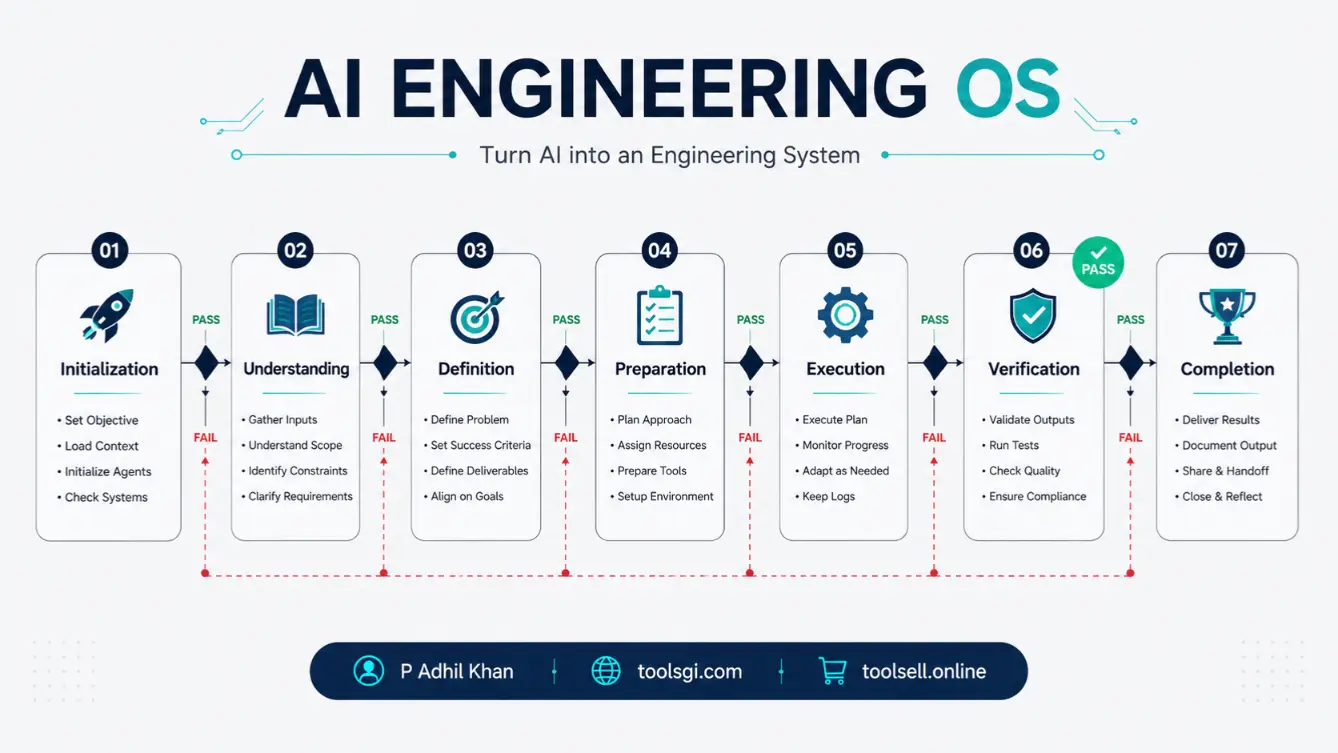
The 7-Stage Engineering Lifecycle
Every project follows one continuous lifecycle: Project Initialization, Project Understanding, Project Definition, Project Preparation, Project Execution, Project Verification, Project Completion.
Each stage has a purpose, an entry condition, an exit condition, and a completion state. No stage is skipped. No stage begins before the previous one is complete. This lifecycle is the backbone of the whole system.
Ten Engineering Disciplines
MASTER_RULEBOOK.md defines 10 engineering standards: Engineering Foundation, Project Discovery, Requirement Analysis, Research, Planning, Architecture, Development, Verification, Deployment, and Operations and Maintenance. Each discipline defines what “good” means, and the AI operates under all 10 on every project.
Forty-Two Engineering Checklists
CHECKLISTS.md carries 42 executable checklists across project initiation, engineering implementation, quality assurance, and operations and maintenance. The AI runs these and reports its verdict with evidence attached. Checklists turn “it looks done” into “here is the proof,” which is the part most online AI guidance skips.
Evidence-Based Quality Gates
Every stage ends with a quality gate. The AI reports one of three verdicts:
– PASS: the stage meets its exit criteria with evidence.
– FAIL: the stage does not meet the bar, and work returns to that stage.
– CONDITIONAL PASS: the stage passes with recorded conditions you need to review.
Nothing moves to the next stage without your approval. This gate system is the governance mechanism that keeps AI output honest.
Baselines and Audit Trails
A baseline is a frozen snapshot of the current state: requirements, architecture, or code. Baselines stop scope from drifting, because any change after a baseline needs review and approval. The audit trail records the engineering history: what was decided, built, tested, verified, and approved. It is documentation you can review yourself and evidence you can hand to a client.
Beginner Mode
You do not have to start with code. You can start with an idea. Beginner Mode explains every technical decision in plain language. You bring the idea, the answers to clarifying questions, the decisions, the approvals, and your testing feedback. The AI handles the research, the structure, the build, and the iteration. This does not mean anyone can build anything with zero technical involvement. It means the technical heavy lifting runs through a structured system while you stay in control of what gets built.
Developer Mode
If you already know how to code, Developer Mode runs the same core at full technical depth: requirements, architecture governance, codebase analysis, testing, refactoring, performance, security, deployment, and maintenance. For developers, the value is consistency: the same process on every project and model, baselines that survive session breaks, architecture designed and frozen before code, and verification backed by evidence instead of claims.
Idea-to-Product
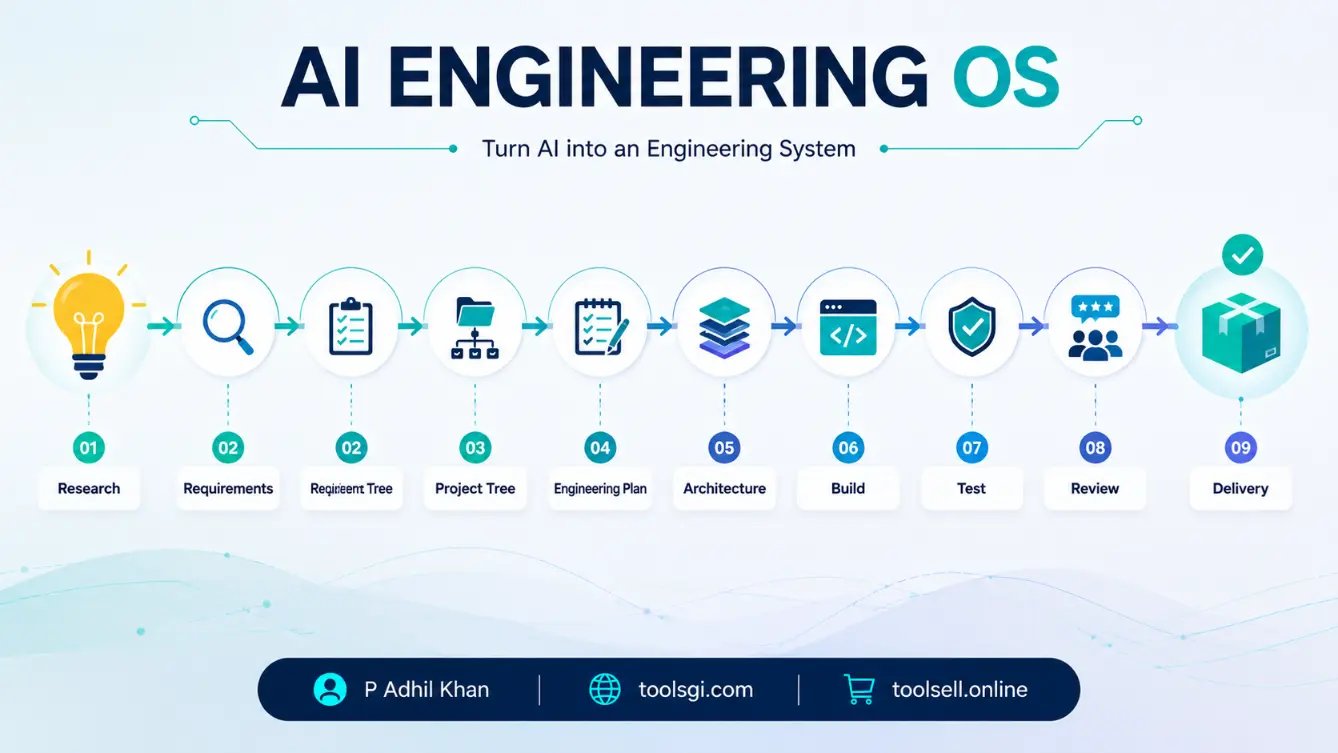
The Idea-to-Product workflow is the strongest entry point for a new idea: IDEA, research, requirements, project tree, engineering plan, architecture, file-by-file development, local testing, review, improvement, verification, delivery. This path matters most for non-coders, beginners, course creators, indie builders, and product creators who want a guided route from an idea to something they can actually run.
Idea-to-File
The Idea-to-File workflow compresses that path for single-file projects. You start with an idea, get a structured specification, and end with a working file ready to test. It is the fastest way to validate a small tool idea under the same governance.
Build-from-Scratch
Scratch development is a first-class capability: IDEA, discovery, requirements, research, planning, architecture, implementation, verification, deployment, operations and maintenance. The system provides the engineering process; you provide the requirements, project context, resources, approvals, and decisions. It does not build every product automatically, and it never claims to. It guides a governed build.
Existing-Codebase Workflow
Existing-codebase development is the second first-class capability, and it follows one governing principle: understand before modifying. EXISTING CODEBASE, discovery, current-state baseline, dependency and impact analysis, change plan, implementation, regression verification, updated baseline. This covers legacy software, existing apps, sites, plugins, themes, SaaS products, and AI agents. The AI analyzes the codebase first, reports verified facts, protects stable functionality, makes only the required changes, and runs full regression before calling the work done.
Multi-LLM Workflow
The system stays consistent even when the model or environment changes. You can assign different models to different roles: Model A for research, Model B for architecture and critique, Model C for implementation, Model D for review and testing analysis. Review findings go back to the implementation agent, which applies the approved changes and verifies again. Baselines and project state live in the project files, so switching models loses nothing. The creator reports using this system across
ChatGPT,
Claude,
Grok,
OpenRouter,
OpenCode,
Codex,
VS Code-based AI environments,
AgentRouter,
OmniRouter, and
Antigravity [OWNER-REPORTED]. No official integration with any platform is claimed.
Model Handoff
Model Handoff is the companion workflow to Multi-LLM. When one session ends, or you move to a different model, the handoff file preserves the project state: where things stand, what was decided, what was verified, and what comes next. The next model resumes from the baseline instead of starting over from zero.
Local Testing Loop
Build locally, test locally, iterate with AI: BUILD, run locally, test, capture results, ask the AI to analyze, improve, test again. The environment depends on the project. XAMPP works for suitable PHP and WordPress projects. Node environments fit suitable Node applications. Browser testing fits websites and extensions. Emulators fit mobile projects. The product does not claim one environment covers everything; your testing feedback is a required input in the loop.
AI Review and Improvement Loop
Two loops keep quality climbing. The improvement loop runs build, run, test, observe, report, analyze, plan, implement, verify, and repeats until the product reaches your desired state. The AI review loop sends the implementation output to a second AI model, which returns findings and a verdict, and the approved fixes go back to the implementation agent. Using a fresh model to review another model’s output catches problems the builder missed. It is optional and one of the strongest quality techniques in the system.
What Can Be Built
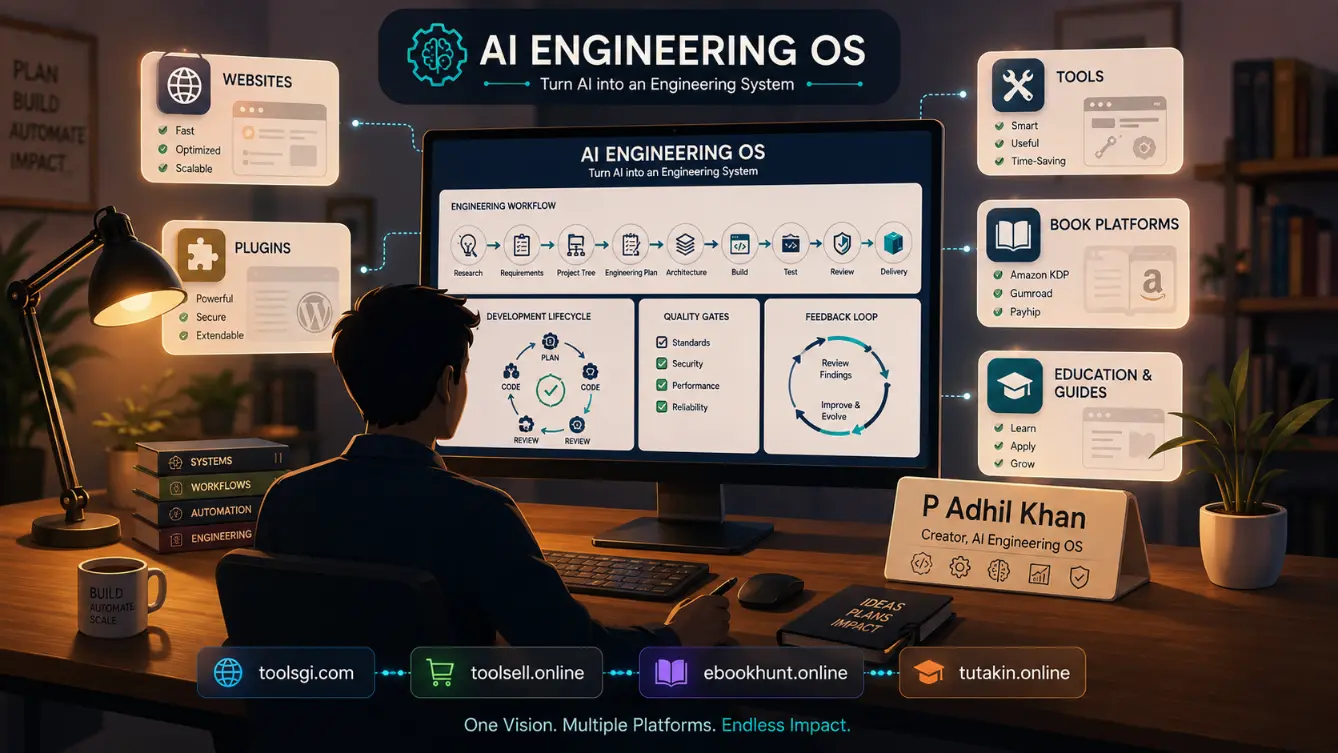
The methodology applies to many project types when your AI tools and environment support the required technology: websites and web applications, SaaS apps, software tools, mobile apps, WordPress plugins, themes, and WooCommerce extensions, browser extensions, APIs and automation, AI agents, internal tools, digital product engines, and custom utilities. Build from scratch or evolve an existing codebase. WordPress is one supported domain among many, not the product’s identity.
WordPress and WooCommerce Use Case
WordPress plugin, theme, and WooCommerce workflows are included with professional WordPress standards: hooks, enqueueing, escaping, sanitization, nonces, and upgrade-safe patterns. The workflow runs through the same lifecycle: understand the site, baseline the current state, plan the change, implement, and verify with regression before shipping. WordPress creators get a repeatable process that protects the stability of live sites.
SaaS, Software, and Tool Use Cases
For SaaS applications, software tools, browser extensions, and internal utilities, the system delivers the same result every time: requirements frozen before code, architecture decided before implementation, verification with evidence, and a maintainable codebase with an audit trail. Product builders get a governed path from idea to a version they can actually test.
AI Agent Use Cases
AI agent builders use the system to keep agent behavior governed and verifiable. The rules define identity and boundaries, the checklists verify scope and evidence, and the AI review loop catches unverified claims before they ship. Agents built under the system carry documentation of what they were told to do and how they proved it.
Digital Product, Book, and Content Engine Use Cases
Book engines, content platforms, and digital product systems run through a dedicated workflow that mirrors the process the creator reports using to build real platforms such as
ebookhunt.online,
toolsgi.com, and
tutakin.online [OWNER-REPORTED]: define the engine’s structure, baseline the content model, build the generation flow, test the output locally, and iterate under review.
Freelancer and Agency Use Cases
Freelancers and agencies get a reusable process across every client. The lifecycle produces stage documents, baselines, and audit trails a client can review, so deliverables ship with evidence instead of promises. The multi-LLM workflow lets one person act like a small team: research, architecture, implementation, and review as separate roles.
Non-Coder Workflow: “I Have an Idea, but I Don’t Know How to Code”
1. Explain the idea to an AI.
2. Research and clarify the idea.
3. Convert it into requirements in plain language.
4. Create the project tree.
5. Create an engineering plan.
6. Build the project file by file.
7. Run it locally.
8. Send the test results back to the AI.
9. Review and improve.
10. Verify before delivery.
AI Engineering OS provides the engineering structure around that process. You stay responsible for decisions, approvals, and testing. The methodology lowers the technical barrier; it does not claim zero technical involvement.
Developer Workflow: “I Already Code, but AI Work Becomes Inconsistent”
1. Load the engineering system into your environment.
2. Establish project context.
3. Analyze requirements.
4. Baseline the codebase.
5. Plan changes.
6. Implement.
7. Run the checklists.
8. Review with evidence.
9. Regression test.
10. Update the baseline.
The result is AI-assisted work that follows the same discipline as human-reviewed engineering, on every project and every model.
Why It Is Different From a Prompt Pack
A prompt is an instruction. AI Engineering OS is the surrounding engineering system. Prompts are one layer of the product, not the product itself. The full system stacks up as PROMPTS, WORKFLOWS, ENGINEERING DISCIPLINES, CHECKLISTS, QUALITY GATES, BASELINES, VERIFICATION, AUDIT TRAIL. That combination, packaged with 12 examples and 7 platform guides, is what you buy. A prompt pack gives you instructions; AI Engineering OS gives you the engineering process those prompts run inside.
Difference From Scattered Free Rule Files
Many scattered rule files focus on a tool, model, or individual workflow. AI Engineering OS packages a broader engineering lifecycle and verification methodology, works across AI models and AI development environments, and ships with the workflows, examples, prompts, and guides that make it usable the day you buy it. The verification layer is the deepest difference: evidence-based quality gates at every stage, with an audit trail you can show a client. It is also a commercial product with a license, updates, and support behind it.
Builder-Level Methodology vs Enterprise AI Compliance
AI Engineering OS is a builder-level engineering methodology. It is not a regulatory compliance framework, a certification, or a compliance product. It is not an ISO, NIST, or SOC 2 certification.
Enterprise AI governance frameworks manage organizational risk, regulatory compliance, and security oversight for companies deploying AI at scale. AI Engineering OS exists for a different job: directing an AI model through a real engineering process on an actual project, from one person’s idea to a working, verified product. It shares the vocabulary of rules, checklists, and audit trails, but its goal is a built and verified product, not regulatory sign-off.
What You Actually Buy
You are purchasing a structured engineering methodology package. It is not a software application, a hosting service, an AI model, an automatic app builder, or a coding IDE. It is a plain-text and Markdown knowledge product that works with the AI tools you already use.
The download contains:
– 3 core engineering files (AGENTS.md, MASTER_RULEBOOK.md, CHECKLISTS.md)
– 24 prompts, 15 workflows, 12 worked examples, 7 platform guides
– Beginner mode, developer mode, idea-to-product, idea-to-file
– Multi-LLM, model handoff, local testing workflows
– Build-from-scratch and existing-codebase workflows
– Founder case study and master usage prompt
– Customer documentation: README, quick start, user guide, FAQ, changelog, license
Everything is plain text and Markdown. No installation, no license keys, no software to run.
Requirements
– Any AI model or agent that can read files or receive pasted content and follow instructions: ChatGPT, Claude, Grok, Codex, OpenCode, OpenRouter-style routers, VS Code-based AI environments, and similar tools.
– A computer with an internet connection. Nothing gets installed.
– For file-based builds: an AI coding environment and a project folder. Optional.
– For local testing: whichever environment fits your project. Optional for some project types.
Example Workflow
A beginner wants to build a small tool that turns CSV files into clean HTML tables.
– User input: the idea, plus “I know nothing about code,” plus the beginner mode prompt.
– System process: the AI runs the lifecycle in Beginner Mode, clarifies the idea, researches the audience, writes plain-language requirements, builds a project tree, creates an engineering plan, and builds the tool file by file with checklists and quality gates.
– Output: a working local tool, a documented project folder, and a verified checklist report showing what passed and how it was tested.
– Verification: the user runs the tool locally, sends results back to the AI for review, and approved improvements are applied and retested.
AI Engineering OS provides the methodology and the governance around it. It does not claim automatic product creation.
Sample Prompt and Result
– User input: “I have an idea for a tool that turns CSV files into clean HTML tables. I know nothing about code. Guide me step by step using the system.”
– System process: the AI loads the three core files, identifies the project type, and runs the Idea-to-Product lifecycle in Beginner Mode.
– Expected output: a structured project folder with a requirements document, project tree, engineering plan, the tool files, a quick-test guide, and a checklist report showing PASS verdicts with evidence.
– Verification: you run the tool locally, send results to a second AI model for review, apply approved findings, and update the report before delivery.
Representative example only; actual outputs vary with your project, environment, and approvals.
Commercial Use License
Your Commercial Use License covers personal projects, commercial projects, and client projects. You can use the system to build websites, plugins, themes, tools, AI agents, and other deliverables for yourself or your clients, and you can sell the software you build with it. You cannot resell AI Engineering OS itself, redistribute the original package, sublicense it, or repackage it as a competing product.
Updates
Updates are lifetime, delivered through future product releases and change logs. No specific number of future updates is promised.
Support
Support covers basic usage and installation through the store contact channel, plus the quick start, user guide, FAQ, and platform guides. This is not unlimited one-to-one engineering consulting.
Limitations
AI Engineering OS is a documentation product. It does not execute code, host websites, or replace your existing tools. It does not build products automatically, and it does not remove the need for human direction, decisions, approvals, and testing. Implementation quality depends on your project, your environment, your files, and your approvals. No performance multiplier is claimed, and no production outcome is guaranteed.
Final CTA
You have three choices right now. Keep prompting AI models without structure and hope the output holds together. Assemble your own rules from scattered free files. Or start with a complete engineering methodology at an accessible one-time launch price rather than a recurring subscription. It was built in real use, works across AI models and AI development environments, and comes with lifetime updates.
Start building with AI Engineering OS – $12 launch, $29 regular. Commercial use license included.







Reviews
There are no reviews yet.