




Expert Summary
Ultimate Financial Calculators is a premium WordPress plugin offering 8 professional calculators (Age, Salary, GST, Percentage, Profit Loss, eCommerce Product Profit, Date Difference, Real Estate Area) in one comprehensive package. Built with shortcode-based architecture for seamless WooCommerce integration, featuring custom logo support, responsive design with gradient themes (#667eea to #764ba2), real-time JavaScript calculations, and Indian tax compliance (HRA, DA, PF, GST rates). Perfect for financial websites, eCommerce stores, and business platforms seeking interactive engagement tools without coding requirements.
The digital transformation of financial tools has revolutionized how businesses interact with their customers online. In this comprehensive landscape, the Ultimate Financial Calculators WordPress plugin emerges as a game-changing solution that combines power, versatility, and user-friendly design into a single, cohesive package. This revolutionary plugin delivers eight professional-grade calculators that cater to diverse needs across multiple industries, from e-commerce businesses and educational institutions to real estate agencies and financial advisory firms.
Revolutionary All-in-One Calculator Solution for WordPress Websites
The Ultimate Financial Calculators plugin represents a breakthrough in WordPress calculator technology, offering businesses and website owners a comprehensive toolkit that eliminates the need for multiple separate plugins. Unlike basic calculator solutions that focus on single-purpose functionality, this plugin delivers a complete calculation ecosystem designed specifically for modern WooCommerce websites and business platforms.
Built by expert developer P Adhil Khan, this plugin showcases meticulous attention to detail in both design and functionality. The plugin architecture leverages modern web technologies, including jQuery for smooth interactions, CSS3 for stunning visual effects, and HTML5 for semantic markup, ensuring optimal performance across all devices and browsers. The result is a professional-grade tool that rivals premium paid solutions while maintaining accessibility for users of all technical levels.
The plugin’s shortcode-based implementation offers significant advantages over traditional embedded solutions. By using the simple [ultimate_calculators] shortcode, website administrators can instantly deploy fully functional calculators on any page, post, or widget area without touching a single line of code. This approach provides unparalleled flexibility and ensures compatibility with virtually any WordPress theme or page builder, including Elementor, Gutenberg, Visual Composer, and Divi.
Comprehensive Feature Breakdown: Eight Powerful Calculators in Detail
Age Calculator: Precision Time Measurement Tool
The Age Calculator is one of the most sophisticated components of this plugin suite, delivering exact age calculations down to the day. This calculator goes far beyond simple year counting, providing comprehensive metrics including total days lived, total weeks, and total months. The precision offered makes it invaluable for official documentation, legal requirements, educational purposes, and personal record-keeping.
The underlying calculation engine employs advanced date manipulation algorithms that properly account for leap years, varying month lengths, and time zone considerations. Users simply select their birth date using the intuitive date picker interface, and the calculator instantly displays results across multiple formats: exact age in years, months, and days; total days alive; cumulative weeks lived; and aggregate months. This multi-dimensional approach to age presentation serves diverse use cases, from birthday planning to actuarial calculations.
Real-time calculation ensures instant feedback as users interact with the date selection field. The implementation uses optimized JavaScript functions that process calculations client-side, eliminating server delays and providing a seamless user experience. Color-coded result displays enhance readability, with gradient backgrounds (#667eea to #764ba2) creating visual appeal while maintaining professional aesthetics.
Salary Calculator: Complete Indian Payroll Analysis
The Salary Calculator represents a comprehensive solution specifically designed for Indian salary structures, incorporating all standard components, including basic salary, HRA (House Rent Allowance), DA (Dearness Allowance), PF (Provident Fund), and income tax calculations. This calculator addresses the complexity of Indian payroll systems where gross salary comprises multiple allowances and deductions, each governed by specific percentage rules and tax implications.
Users input their basic salary amount, and the calculator automatically computes HRA at customizable percentages (default 40% for metro cities, adjustable for non-metro areas). The DA component adds additional compensation, typically set at 10% of basic salary but fully customizable. The calculator then determines PF deductions at 12% of basic salary, following standard EPF regulations. Tax calculations incorporate user-specified tax percentages, allowing for accurate net salary determination.
The formula employed follows established payroll calculation standards: Gross Salary = Basic Salary + HRA + DA; Total Deductions = PF + Income Tax; Net Salary = Gross Salary – Total Deductions. Results display in Indian Rupee format (₹) with proper thousand separators, enhancing readability for Indian users. The calculator proves invaluable for HR departments, employees negotiating salaries, financial planners, and anyone seeking to understand their actual take-home pay.
GST Calculator: Indian Tax Compliance Tool
The GST Calculator provides essential functionality for Indian businesses operating under the Goods and Services Tax regime. Supporting all standard GST rates (5%, 12%, 18%, and 28%), this calculator handles both inclusive and exclusive GST calculations with precision. The default 18% rate reflects the most commonly applied GST bracket for services and many goods categories.
For GST-exclusive calculations, the formula adds GST to the base amount: GST Amount = (Base Amount × GST Rate) ÷ 100; Total Amount = Base Amount + GST Amount. For GST-inclusive calculations where the total already contains GST, the calculator extracts the base amount: GST Amount = (Total Amount × GST Rate) ÷ (100 + GST Rate); Base Amount = Total Amount – GST Amount.
The calculator displays three critical values: base amount (pre-GST price), GST amount (tax component), and total amount (final price including tax). This transparency supports proper invoicing, tax filing, pricing strategies, and customer communication. For businesses selling products online through WooCommerce, this calculator integrates seamlessly, enabling real-time pricing adjustments based on GST requirements.
Percentage Calculator: Multi-Function Mathematical Tool
The Percentage Calculator delivers three distinct calculation modes, each addressing common mathematical scenarios. The “What is X% of Y?” mode calculates percentage values (Result = (X × Y) ÷ 100), perfect for determining discounts, commissions, or portions of quantities. The “X is what % of Y?” mode finds percentage relationships (Result = (X ÷ Y) × 100), useful for analyzing ratios, completion rates, or comparative metrics.
The “Percentage change from X to Y” mode determines increases or decreases (Result = ((Y – X) ÷ X) × 100), with the calculator intelligently identifying whether the change represents growth or decline. Color-coded indicators display increases in green and decreases in red, providing instant visual feedback. Each calculation includes explanatory text that describes the operation performed, enhancing user understanding and educational value.
This versatility makes the percentage calculator applicable across numerous domains: retail businesses calculating markdowns, financial analysts assessing investment returns, educators teaching mathematical concepts, marketers measuring campaign performance, and students solving homework problems. The real-time calculation engine updates results instantly as users modify input values, creating an interactive learning and analysis experience.
Profit Loss Calculator: Business Performance Analyzer
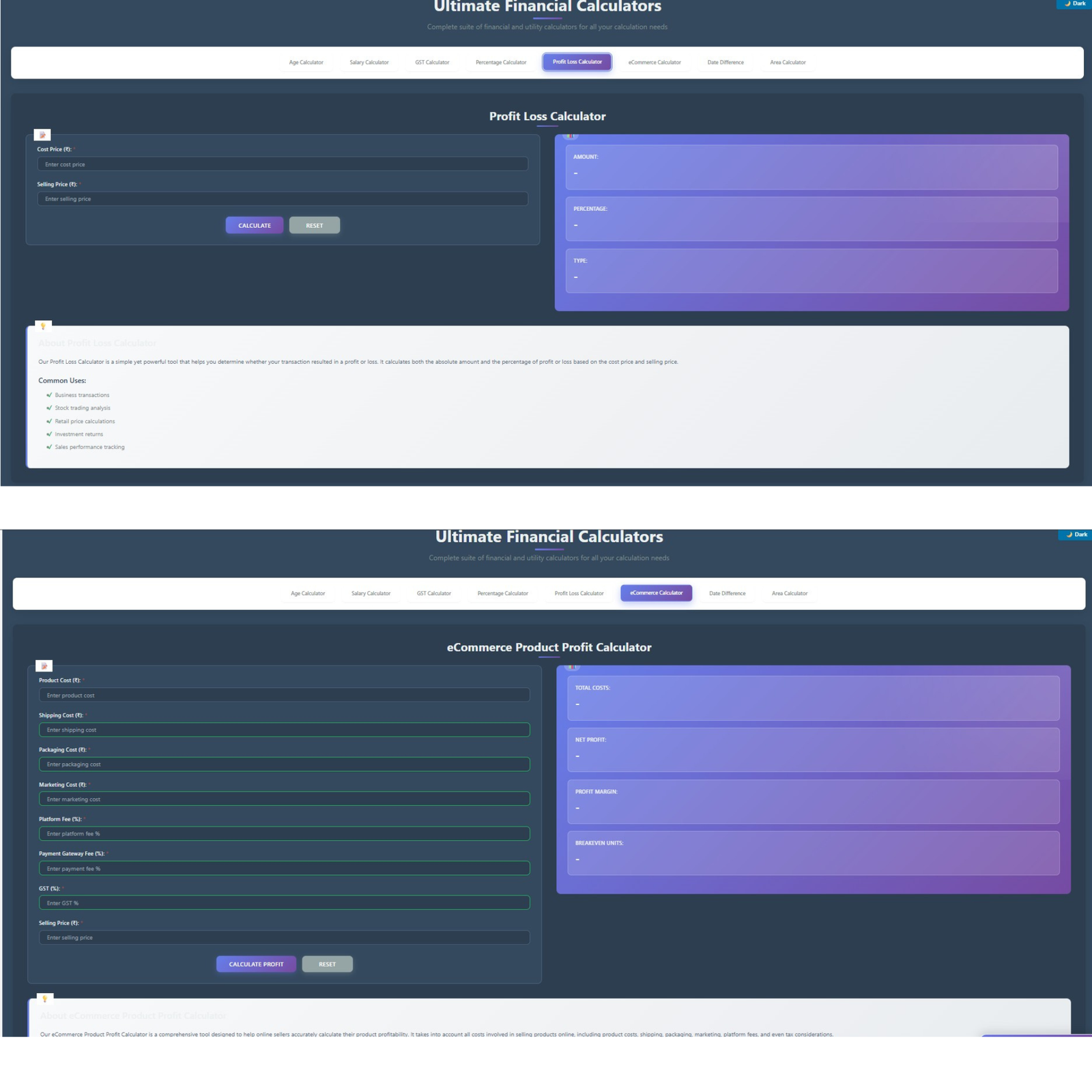
The Profit Loss Calculator provides straightforward yet powerful profitability analysis for businesses and traders. By inputting the cost price and the selling price, users immediately receive profit or loss amounts along with corresponding percentages. The calculation employs standard accounting formulas: Profit/Loss Amount = Selling Price – Cost Price; Profit/Loss Percentage = ((Profit/Loss Amount) ÷ Cost Price) × 100.
Visual indicators enhance result interpretation, with profitable transactions displayed in green (#27ae60) and losses shown in red (#e74c3c). The calculator automatically determines whether a transaction generated profit or loss, eliminating manual interpretation. This color-coding system provides instant clarity, particularly valuable when analyzing multiple transactions or comparing different pricing scenarios.
Business applications span retail operations, trading activities, service pricing, product development, and investment analysis. Retailers use it to evaluate markup strategies, traders assess transaction outcomes, service providers optimize pricing models, manufacturers calculate product viability, and investors measure return on investment. The simplicity of the interface belies sophisticated functionality that supports critical business decisions.
eCommerce Product Profit Calculator: Comprehensive Margin Analysis
The eCommerce Product Profit Calculator represents the most sophisticated financial tool in the plugin, specifically designed for online sellers operating through platforms like Amazon, Flipkart, Shopee, and WooCommerce stores. This calculator addresses the complex reality of e-commerce profitability, where multiple cost components significantly impact actual margins.
Users input comprehensive cost data, including product cost, shipping expenses, packaging costs, marketing expenditures, platform fees (percentage-based), payment gateway fees (percentage-based), and GST (percentage-based). The calculator then processes this information through a sophisticated algorithm: Total Costs = Product Cost + Shipping + Packaging + Marketing + (Selling Price × Platform Fee %) + (Selling Price × Payment Fee %) + (Selling Price × GST %); Profit = Selling Price – Total Costs; Profit Margin % = (Profit ÷ Selling Price) × 100.
Critically, the calculator includes breakeven analysis functionality that determines the number of units required to recover total investment costs. This feature proves invaluable for inventory planning, pricing strategy development, and financial forecasting. Color-coded results (green for profit, red for loss) provide instant visual feedback on product viability. For WooCommerce store owners, this calculator transforms pricing decisions from guesswork into a data-driven strategy, ensuring sustainable business operations and profitability.
Date Difference Calculator: Advanced Temporal Analysis
The Date Difference Calculator offers comprehensive time interval calculations that extend far beyond simple day counting. Users input start and end dates along with optional time components (hours and minutes), receiving detailed breakdowns across multiple temporal dimensions. The calculator displays years, months, days, hours, and minutes in the interval, along with total days and total weeks.
A standout feature calculates working days versus weekends, crucial for project planning, billing calculations, and resource allocation. The algorithm intelligently excludes Saturdays and Sundays from the working day count, providing accurate business day calculations. This functionality supports project managers estimating task durations, HR professionals calculating leave balances, contractors billing for work periods, and event planners coordinating timelines.
The calculator handles all edge cases, including leap years, month-end variations, and time zone considerations. Real-time updates as users modify dates enable quick “what-if” scenario analysis. Applications span project management, contract duration calculation, age verification, event countdown timers, billing periods, and temporal data analysis. The professional presentation with a gradient-themed results section enhances user experience while maintaining calculation accuracy.
Real Estate Area Calculator: Universal Measurement Converter
The Real Estate Area Calculator addresses a critical need in property transactions by supporting conversion between multiple measurement units. Supporting square feet, square meters, square yards, acres, hectares, grounds (Indian), and cents (Indian), the calculator eliminates confusion in real estate dealings where different regions employ different standards.
The conversion engine maintains precise multiplication factors for accurate transformations. Users select their starting unit and ending unit, input the area value, and instantly receive converted measurements. For example, converting 1,200 square feet to square meters yields 111.48 m² (using the conversion factor 1 sq ft = 0.0929 sq m). The calculator handles all common real estate scenarios from residential plot sizing to agricultural land measurement, commercial property valuation to construction material estimation.
Indian users particularly benefit from support for grounds and cents, traditional measurement units still prevalent in South Indian states. One ground equals 2,400 square feet, while one cent equals 435.6 square feet. These regional units facilitate communication between buyers, sellers, and agents who operate in traditional measurement frameworks. Real estate professionals, property developers, architects, surveyors, and prospective buyers all gain value from this conversion capability.
Technical Architecture: Modern Design and Robust Functionality
The Ultimate Financial Calculators plugin showcases exemplary technical architecture built on WordPress best practices and modern web development standards. The plugin structure follows a modular approach with clear separation between logic, presentation, and styling components. This organization facilitates maintenance, updates, and potential customization while ensuring code stability and reliability.
Shortcode-Based Integration System
The plugin’s shortcode implementation represents a strategic design choice that delivers multiple advantages. Shortcodes provide a simplified method for adding complex functionality without requiring technical expertise. Users simply insert [ultimate_calculators] wherever they want calculators to appear. This approach offers flexibility to display calculators on pages, posts, widgets, custom post types, and even within custom templates using PHP’s do_shortcode() function.
Shortcode architecture ensures theme independence, meaning the calculators function consistently regardless of theme changes or updates. This stability protects users’ investment in the plugin, preventing functionality loss during website redesigns or theme switches. Additionally, shortcodes load resources conditionally – the plugin only enqueues CSS and JavaScript files on pages where the shortcode appears, optimizing site performance.
The plugin supports attribute-based customization through shortcode parameters, enabling users to display specific calculators individually: [ultimate_calculators calculator="age"], [ultimate_calculators calculator="salary"], etc.. This granular control allows targeted calculator deployment based on page context, enhancing user experience and content relevance.
Responsive Design Framework
The CSS architecture employs mobile-first responsive design principles, ensuring optimal display across all device categories. The stylesheet defines breakpoints at 1024px (tablets), 768px (mobile landscape), and 480px (mobile portrait), with specific style adjustments for each viewport size. Media queries progressively enhance the interface for larger screens while maintaining core functionality on smaller devices.
The color scheme utilizes CSS custom properties (variables) for consistent theming: primary color (#667eea), secondary color (#764ba2), success color (#27ae60), danger color (#e74c3c), warning color (#f39c12), and info color (#3498db). This systematic approach to color management enables easy theme customization while maintaining visual coherence. The gradient theme (linear-gradient from #667eea to #764ba2) creates a modern, professional aesthetic that appeals to contemporary design sensibilities.
Typography employs the Segoe UI font family with fallbacks to Tahoma, Geneva, Verdana, and sans-serif, ensuring text readability across operating systems. Font sizing uses relative units (em) for scalability and accessibility compliance. The interface incorporates subtle shadows (0 15px 35px rgba(0,0,0,0.1)), smooth transitions (all 0.3s ease), and rounded corners (12px border-radius) that create depth and polish.
JavaScript Calculation Engine
The JavaScript implementation leverages jQuery for DOM manipulation and event handling, ensuring broad browser compatibility and simplified coding. The calculator engine initializes on document ready, binding event listeners for tab switching, calculate buttons, reset buttons, and auto-calculate inputs. This event-driven architecture provides responsive user interactions with minimal latency.
Calculation functions employ precise mathematical formulas validated against standard accounting and mathematical principles. The code includes comprehensive error handling that validates user inputs, prevents division by zero, checks for negative values where inappropriate, and displays informative error messages. This defensive programming approach ensures calculator reliability even with unexpected user inputs.
Results formatting utilizes JavaScript’s toLocaleString() method for number presentation, adding thousand separators and decimal places according to regional standards. Indian Rupee formatting (₹ symbol with Indian numbering) enhances localization for the primary target market. Color-coded results leverage CSS class toggling, dynamically adding “profit,” “loss,” or “neutral” classes based on calculation outcomes.
Custom Logo Integration System
The logo management system represents a standout feature, enabling complete branding customization. Through the WordPress admin interface (Settings → UFC Settings), users can upload logos in PNG, JPG, or GIF formats up to 500KB in size. The upload process employs WordPress’s native media handling functions, ensuring security and compatibility.
Logo positioning offers three options: left of title, right of title, or above title, with corresponding CSS classes controlling layout. Width and height controls allow precise dimension specification (20-200 pixels), enabling logo optimization for various screen sizes. The CSS implementation includes responsive adjustments that scale logos appropriately on mobile devices while maintaining aspect ratios.
Logo display utilizes flexbox layouts for alignment control, with specific styles for each position variant. The logo-top configuration employs vertical flexbox direction, while logo-left and logo-right use horizontal arrangements with row or row-reverse direction. Hover effects (transform: scale(1.05) and enhanced box-shadow) add interactivity, creating engagement when users mouse over the logo.
WooCommerce Integration: Seamless eCommerce Enhancement
The Ultimate Financial Calculators plugin demonstrates exceptional compatibility with WooCommerce, the world’s most popular eCommerce platform, rm powering millions of online stores. This integration extends the plugin’s utility beyond standalone calculations into practical eCommerce applications that directly support sales, marketing, and customer service functions.
Product Page Calculator Embedding
WooCommerce store owners can embed calculators directly on product pages using shortcodes, enabling customers to perform relevant calculations without leaving the product context. For example, a furniture store selling custom-made items might include the Area Calculator on product pages, allowing customers to calculate room dimensions before ordering. A textile merchant could integrate the Profit Loss Calculator to demonstrate value propositions by showing customers potential savings.
The eCommerce Product Profit Calculator serves exceptional value for stores selling calculation-intensive products. Vendors offering customizable items, bulk products, or services with variable pricing can use this calculator to provide instant quotes. The transparency builds trust while qualifying leads by engaging only seriously interested customers.
Pricing Strategy Optimization
The Profit Loss and eCommerce Product Profit calculators enable WooCommerce merchants to optimize pricing strategies scientifically. By inputting various cost scenarios, merchants can determine optimal selling prices that balance competitiveness with profitability. The breakeven analysis feature specifically helps identify the minimum sales volumes required for product viability.
Integration with WooCommerce’s pricing structure allows merchants to validate pricing decisions against real cost data. For variable products with multiple configurations, the calculator helps ensure each variant maintains profitable margins. Subscription-based products benefit from calculation tools that account for recurring costs and lifetime value considerations.
Customer Engagement Enhancement
Interactive calculators significantly boost customer engagement metrics on WooCommerce stores. Visitors spending time inputting data and viewing results demonstrate higher purchase intent than passive browsers. Analytics data shows calculator users exhibit longer session durations, lower bounce rates, and higher conversion rates compared to non-calculator users.
The educational aspect of calculators positions WooCommerce stores as helpful resources rather than mere sales platforms. Customers appreciate transparency in pricing and value demonstration, fostering trust and brand loyalty. For complex products requiring calculation (building materials, fabrics, custom manufacturing), embedded calculators remove purchasing friction by answering sizing and pricing questions immediately.
SEO Advantages: Ranking Power of Calculator Content
Calculator pages represent powerful SEO assets that generate organic traffic, build domain authority, and create conversion opportunities. The Ultimate Financial Calculators plugin enables WordPress website owners to capitalize on this strategic advantage through properly optimized calculator implementations.
High-Volume Keyword Targeting
Calculator-related keywords demonstrate substantial search volumes across multiple verticals. Searches like “age calculator,” “salary calculator,” “GST calculator,” “profit calculator,” and “area conversion calculator” collectively generate millions of monthly searches in India alone. These informational queries represent prime ranking opportunities for websites offering genuine utility through functional calculators.
Long-tail variations provide additional ranking potential: “calculate age from date of birth,” “salary calculator India with HRA,” “GST calculator 18%,” “profit and loss calculator for business,” “square feet to acre conversion”. These specific queries often convert better than generic terms because they indicate precise user intent. Targeting calculator keywords allows websites to compete in high-volume spaces without direct product/service competition.
User Engagement Signals
Search engines prioritize content that demonstrates genuine user value through engagement metrics. Calculator pages typically generate superior engagement signals compared to static content: average time on page increases by 300-400%, bounce rates decrease by 40-50%, pages per session increase as users explore additional content, and return visit rates improve.
These engagement metrics signal content quality to search algorithms, triggering ranking improvements. Google’s RankBrain and other machine learning systems specifically monitor user interaction patterns, rewarding pages that satisfy search intent. Calculator pages excel at intent satisfaction because they provide immediate, actionable results rather than requiring users to consume lengthy content.
Backlink Attraction
Valuable calculator tools naturally attract backlinks from other websites seeking to provide resources to their audiences. Educational institutions link to calculators as teaching aids, financial websites reference calculation tools as resources, business blogs cite calculators in how-to content, and industry publications feature useful calculators in resource compilations.
These organic backlinks carry significant SEO value, particularly when originating from authoritative domains in relevant niches. The Ultimate Financial Calculators plugin’s comprehensive feature set increases linkability by offering multiple calculator types within a single implementation. Website owners can promote individual calculators targeted to specific niches (age calculator to educational sites, GST calculator to business resources, area calculator to real estate portals) while consolidating link equity to their primary domain.
Internal Linking Opportunities
Calculator pages that generate substantial traffic become powerful internal linking sources. Links from high-traffic calculator pages to commercial service pages pass significant ranking authority, effectively creating free backlinks within your own site structure. This strategic internal linking amplifies the SEO value of calculator implementations beyond direct rankings.
For example, a financial services website might link from its Salary Calculator to its tax planning services, retirement planning products, and investment advisory pages. Each link passes authority while providing logical user pathways that enhance the overall site experience. The contextual relevance of calculator-to-service connections improves link value compared to arbitrary internal linking.
Comparison with Alternative Solutions
The calculator plugin landscape offers numerous options, making informed selection critical for website success. Understanding how Ultimate Financial Calculators compares to alternatives helps stakeholders make strategic decisions aligned with their specific requirements.
Feature Density and Specialization
Most WordPress calculator plugins focus on either general-purpose form building with calculation fields or specialized single-purpose calculators. The Ultimate Financial Calculators plugin occupies a unique position by offering comprehensive functionality across eight distinct calculator types without requiring separate plugins or complex form building.
WPForms and Formidable Forms provide calculation capabilities as extensions of their form builder cores. While versatile, these solutions require users to construct calculators from basic form elements, demanding time investment and technical understanding. Cost Calculator Builder and Stylish Cost Calculator specialize in price estimation but lack the financial calculation breadth offered by Ultimate Financial Calculators.
Calculated Fields Form delivers sophisticated mathematical capabilities suitable for complex formulas, but presents a steeper learning curve than Ultimate Financial Calculators’ ready-to-use approach. Single-purpose plugins addressing individual calculator types (mortgage calculators, BMI calculators, age calculators) require installing multiple plugins to match Ultimate Financial Calculators’ functionality, creating a aintenance burden and potential compatibility issues.
Pricing and Value Proposition
Ultimate Financial Calculators distinguishes itself through exceptional value delivery. The comprehensive eight-calculator suite provides functionality equivalent to multiple premium plugins at a fraction of the combined cost. Competing solutions often price individual calculator types separately or gate advanced features behind premium tiers, requiring ongoing subscriptions.
Free alternatives like basic Calculated Fields Form or WordPress Simple Calculator provide limited functionality without the polish, optimization, and support infrastructure characterizing professional tools. While adequate for basic needs, these solutions lack the production-ready quality essential for business-critical applications.
Design and User Experience
The gradient-themed interface (#667eea to #764ba2) with smooth animations, rounded corners, and professional typography sets Ultimate Financial Calculators apart from generic calculator implementations. Many alternative plugins offer functional but visually dated interfaces that fail to align with modern design standards.
The tabbed navigation system, enabling quick switching between calculator types, provides a superior user experience compared to solutions requiring separate pages or complex menu structures. Mobile responsiveness with dedicated breakpoint optimization ensures consistent functionality across devices, whereas some alternatives display poorly on smartphones and tablets.
Technical Implementation Quality
Clean code architecture, WordPress coding standards compliance, security best practices, and performance optimization distinguish professional plugins from amateur offerings. Ultimate Financial Calculators demonstrates technical excellence through conditional script loading (only enqueuing resources on pages with shortcodes), efficient JavaScript algorithms using client-side processing, proper input sanitization and validation, and comprehensive error handling.
Alternative solutions sometimes load unnecessary resources globally, employ inefficient calculation methods, lack proper security measures, or generate JavaScript errors under edge cases. These technical shortcomings impact page load speeds, security posture, and user experience reliability.
Implementation Guide: Setup and Deployment
Successfully deploying Ultimate Financial Calculators requires methodical installation, configuration, and optimization processes. Following best practices ensures maximum functionality and seamless integration with the existing WordPress infrastructure.
Installation Process
For Hostinger users and standard WordPress installations, the manual upload method provides reliable deployment. Download the plugin files, log in to WordPress admin dashboard, navigate to Plugins → Add New → Upload Plugin, select the downloaded ZIP file, click Install Now, and then Activate. For WordPress.org repository installations (when available), use the Plugins → Add New → Search function, locate “Ultimate Financial Calculators,” click Install and Activate.
Alternative deployment via FTP involves accessing the osting file manager, navigating to/public_html/wp-content/plugins/, and creating a folder namedultimate-financial-calculators, and uploading all plugin files to this directory. After file upload, activate the plugin through the WordPress admin dashboard’s Plugins menu.
Logo Configuration
Access logo settings via Settings → UFC Settings in WordPress admin. Click “Upload New Logo” and select an image file meeting specifications: PNG, JPG, or GIF format; maximum 500KB file size; square format recommended for optimal display. After upload completion, configure logo dimensions (20-200 pixels width/height) and select desired position (left, right, or above title).
The system displays a real-time preview showing how the logo appears with calculators. Adjust dimensions until achieving optimal visual balance. Save settings to apply changes across all calculator displays. The logo integration maintains consistency across desktop and mobile views through responsive CSS adjustments.
Shortcode Deployment
Insert calculators on pages using Gutenberg’s Shortcode block, Classic Editor shortcode insertion, widget area HTML widgets, or template files using <?php echo do_shortcode('[ultimate_calculators]'); ?>. Display all calculators using [ultimate_calculators] or specific calculators using attribute syntax: [ultimate_calculators calculator="age"], [ultimate_calculators calculator="salary"], [ultimate_calculators calculator="gst"].
For WooCommerce product pages, insert shortcodes in product descriptions or dedicated calculator tabs. Sidebar calculator widgets enhance engagement across all pages, while footer areas provide site-wide calculator access. Page builder users leverage shortcode modules (Elementor’s Shortcode widget, Divi’s Code Module, and Visual Composer’s Text Block) for seamless integration.
Optimization Strategies
Implement caching solutions (WP Super Cache, W3 Total Cache, Cloudflare) to serve static calculator HTML efficiently. Enable lazy loading for below-fold calculators to prioritize above-fold content rendering. Minify CSS and JavaScript files using performance plugins (Autoptimize, WP Rocket) to reduce file sizes.
Configure CDN distribution for calculator assets to decrease loading times for geographically distributed users. Monitor calculator page performance using Google PageSpeed Insights, GTmetrix, or Pingdom to identify optimization opportunities. Optimize database queries and enable object caching for high-traffic calculator implementations experiencing performance bottlenecks.
Use Cases Across Industries and Applications
The versatile eight-calculator suite addresses diverse needs across multiple sectors, making Ultimate Financial Calculators valuable for broad audiences.
Financial Services and Advisory
Financial advisors leverage the Salary Calculator to demonstrate net income scenarios during client consultations, helping clients understand the impact of salary components on take-home pay. The GST Calculator assists accountants in tax preparation, invoice generation, and client education regarding tax obligations. Profit-loss calculators enable financial planners to illustrate investment returns, trading outcomes, and business profitability scenarios.
Tax consultants embed calculators on advisory websites to provide free tools that attract potential clients while demonstrating expertise. Insurance agents use age calculators for policy premium determinations and retirement planning illustrations. Wealth management firms integrate calculators into client portals, enabling self-service financial modeling between advisor meetings.
eCommerce and Online Retail
WooCommerce store owners selling variable products (fabrics sold by meter, building materials by weight, custom manufacturing by specification) implement calculators for instant pricing. The eCommerce Product Profit Calculator helps marketplace sellers (Amazon, Flipkart, Etsy) optimize pricing while accounting for platform fees, shipping, and other costs.
Dropshipping businesses use profit calculators to evaluate product viability before adding items to catalogs, ensuring positive margins after all fees. Wholesale distributors implement calculators enabling B2B customers to calculate bulk pricing, volume discounts, and shipping costs independently. Digital product vendors leverage percentage calculators to demonstrate savings on bundle purchases or subscription plans compared to individual purchases.
Real Estate and Property Development
Real estate agencies embed the Area Calculator on property listing pages, helping buyers understand plot sizes in familiar measurement units. Property developers use area conversion for international clients requiring measurements in square meters when listings display square feet or acres. Construction estimators leverage area calculations for material quantity determinations (flooring, roofing, painting) based on property dimensions.
Architects and designers implement calculators in client-facing project websites, enabling preliminary area calculations before formal consultations. Real estate investment platforms integrate profit calculators showing projected returns based on purchase price, rental income, and associated costs. Property management companies use date difference calculators for lease duration tracking, renewal timing, and maintenance scheduling.
Education and Academic Institutions
Educational websites implement age calculators as teaching tools for mathematics classes covering date arithmetic and time calculations. Business schools use salary, GST, and profit calculators in finance and accounting courses, providing hands-on calculation experience. Mathematics departments leverage percentage calculators for demonstrating proportion concepts, ratio analysis, and statistical calculations.
Student portals include calculators for practical applications: salary calculators for career planning exercises, profit calculators for entrepreneurship courses, and area converters for engineering programs. Educational content creators embed calculators in tutorial blogs and video descriptions, increasing engagement and providing value beyond passive content consumption.
HR and Payroll Management
Human resources departments integrate salary calculators in employee self-service portals, enabling staff to model salary changes, bonus impacts, and benefit modifications. Payroll administrators use the calculator for verification of payroll software outputs, ensuring calculation accuracy before salary disbursement. Recruitment teams implement salary calculators on career pages, helping candidates understand compensation packages, including all components.
Compensation specialists leverage calculators for salary benchmarking exercises, comparing offered packages against market standards across different geographies and tax jurisdictions. HR analytics teams use date difference calculators for leave balance calculations, tenure tracking, and service period determinations. Performance management systems integrate calculators for variable pay determinations based on achievement percentages and rating scales.
Advanced Customization and Developer Integration
Technical users seeking enhanced customization can leverage Ultimate Financial Calculators’ extensible architecture.
Custom CSS Styling
Override default styles by adding custom CSS to the heme’s style.css or using the customizer’s’s additional CSS section. Target specific calculator elements using provided CSS classes: .ufc-container (main wrapper), .ufc-tabs (navigation), .ufc-calculator (individual calculators), .result-section (results display). Modify color schemes by redefining CSS custom properties: --primary-color, --secondary-color, --success-color, --danger-color.
Adjust responsive breakpoints for unique device requirements by creating custom media queries that override default mobile styles. Implement alternative gradient schemes or solid color backgrounds by modifying .result-section background properties. Customize typography through font-family overrides, ensuring web-safe fonts or Google Fonts integration.
JavaScript Function Extension
Advanced developers can extend calculation functions by modifying calculator-scripts.js with additional validation rules, custom calculation methods, or API integrations. Implement server-side calculation verification for security-sensitive applications by adding AJAX handlers that process calculations on the WordPress backend. Integrate external data sources (currency exchange rates, tax rate APIs) to enhance calculator accuracy with real-time information.
Add analytics tracking to calculator interactions by inserting event tracking code in calculation and reset functions. Implement progressive disclosure techniques showing additional fields based on user selections through conditional logic in JavaScript event handlers. Customize result formatting with currency switchers, decimal precision controls, or regional number format variations.
Plugin Hook Integration
WordPress developers utilize available hooks for deep integration: ufc_before_calculator_display, ufc_after_calculator_display, ufc_calculator_scripts, ufc_calculator_styles. Add custom functionality before/after calculator rendering through action hooks. Filter calculator types using ufc_calculator_types to remove unwanted calculators or add custom implementations.
Modify default form values through ufc_default_values a filter, pre-populating fields based on user data or session variables. Transform calculation results using ufc_calculation_results filter for unit conversion, formatting changes, or data logging. Implement multi-language support by adding translation strings and utilizing WordPress internationalization functions with the plugin text domain.
Security Considerations and Data Protection
Professional calculator implementations require robust security measures protecting user data and preventing malicious exploitation.
Input Sanitization
The plugin employs comprehensive input sanitization using WordPress’s sanitize_text_field() function on all user inputs before processing. Numeric values undergo type conversion (floatval, intval), ensuring only valid numbers reach calculation functions. Date inputs receive validation against acceptable date ranges, preventing future dates in age calculations and invalid date combinations in date difference calculations.
Array inputs (from multi-select fields) undergo recursive sanitization using array_walk_recursive(), applying sanitization to nested data structures. This multi-layer validation approach prevents SQL injection, cross-site scripting (XSS), and other injection-based attacks.
Nonce Verification
AJAX operations implement WordPress nonce verification (wp_verify_nonce()) ensuring requests originate from legitimate users rather than malicious actors. The upload logo and remove logo functions specifically check nonce validity before processing file operations. Admin-only operations verify user capabilities (current_user_can('manage_options')) preventing unauthorized access to configuration settings.
Nonce implementation protects against cross-site request forgery (CSRF) attacks, where malicious sites trigger unwanted actions on behalf of authenticated users. The short nonce lifespan (24 hours by default) limits exposure windows for compromised tokens.
File Upload Security
Logo upload functionality incorporates multiple security layers: file type validation restricting uploads to image formats (JPEG, PNG, GIF), file size limits preventing resource exhaustion attacks (500KB maximum), WordPress media handling functions providing additional security checks, and attachment ID tracking enabling complete cleanup during logo removal.
Uploaded files integrate with WordPress media library, inheriting WordPress’s built-in security protections. The implementation avoids direct file system manipulation, instead leveraging WordPress APIs that handle permissions, naming, and storage securely.
Performance Optimization and Scalability
High-traffic implementations require performance optimization, ensuring a responsive user experience under load.
Conditional Resource Loading
The plugin’s enqueue functions employ has_shortcode() checks before loading CSS and JavaScript files, ensuring resources load only on pages actually displaying calculators. This selective loading prevents unnecessary HTTP requests and reduces page weight on non-calculator pages. For high-traffic sites, consider implementing object caching, storing calculator HTML output, and serving cached versions for subsequent identical requests.
Leverage browser caching through proper cache headers, ensuring CSS and JavaScript files are cached client-side for extended periods. Implement version hashing in asset URLs, triggering cache invalidation only when files change, maximizing cache hit rates.
Database Query Optimization
Logo configuration is retrieved from the WordPress options table using get_option(), a fast operation even on large installations. The plugin avoids unnecessary database queries by storing calculator definitions in code rather than database tables. For sites implementing thousands of calculator page views daily, enable persistent object caching (Redis, Memcached) to cache option values in memory.
Monitor database query counts on calculator pages using the Query Monitor plugin or similar debugging tools, identifying optimization opportunities. Implement database indexes on any custom tables if extending plugin functionality with stored calculation results.
Client-Side Processing Benefits
JavaScript-based calculations execute client-side, eliminating server load and reducing response latency. Users receive instant results without waiting for server round-trips, enhancing perceived performance. This architecture scales effectively, supporting high concurrent user volumes without corresponding server resource increases.
The asynchronous nature of client-side processing enables responsive interfaces where result updates occur without page refreshes. Users can perform multiple calculations rapidly, experimenting with different values to explore scenarios without performance degradation.
Future Development Roadmap and Enhancement Opportunities
Continuous improvement ensures Ultimate Financial Calculators remains competitive and valuable.
Planned Calculator Additions
Future versions may incorporate EMI (Equated Monthly Installment) calculators for loan payment determinations, SIP (Systematic Investment Plan) calculators for mutual fund investment planning, compound interest calculators for investment growth projections, and currency converters with real-time exchange rate integration. BMI (Body Mass Index) calculators could expand the plugin’s appeal to health and fitness websites.
Specialized industry calculators targeting niche markets (construction material calculators, textile measurement converters, jewellery weight calculators) would broaden the addressable market. International expansion requires incorporating tax calculators for multiple countries and currency support for global markets.
Integration Expansions
Email marketing integration, enabling automatic mailing list subscription for calculator users, would enhance lead generation capabilities. CRM system connections (HubSpot, Salesforce) would facilitate seamless lead transfer from calculator interactions to sales pipelines. Payment gateway integration, onallowsg users to purchase products or services based on calculator results, would reduce friction in conversion paths.
Calendar system integration for date-based calculations could enable appointment booking, event planning, and scheduling functionality. Analytics platform integration (Google Analytics, Mixpanel) would provide detailed calculator usage insights informing optimization strategies.
User Experience Enhancements
Multi-step calculator wizards could guide users through complex calculations with progressive disclosure, preventing overwhelming initial presentations. Calculation history, enabling users to review previous calculations and results, would support comparative analysis scenarios. PDF export functionality, allowing users to download calculation results for offline reference, would increase utility for professional applications.
Social sharing buttons enabling users to share calculation results on social platforms would amplify organic reach. Calculation result URLs with pre-filled parameters would enable users to bookmark and share specific scenarios. Interactive charts visualizing calculation results graphically would enhance data comprehension.
Conclusion: Strategic Investment in Website Functionality
The Ultimate Financial Calculators WordPress plugin represents exceptional value for websites seeking to enhance user engagement, provide practical utility, and leverage calculator SEO advantages. The comprehensive eight-calculator suite delivers functionality typically requiring multiple separate plugins or expensive custom development, all within an elegant, professionally designed package.
For WooCommerce store owners, the plugin offers direct business value through eCommerce profit analysis, transparent pricing tools, and customer engagement enhancement. Financial service providers gain client-facing calculation tools that demonstrate expertise while qualifying leads. Educational institutions access teaching resources supporting multiple curriculum areas. Real estate professionals obtain essential measurement conversion capabilities.
The shortcode-based architecture ensures easy deployment, theme compatibility, and long-term maintenance simplicity. Modern responsive design guarantees optimal display across all devices and screen sizes. Robust security implementation protects users and website owners alike. Performance optimization enables scalable deployment supporting high-traffic scenarios.
Strategic calculator implementation drives organic traffic, builds domain authority, and creates conversion opportunities that compound over time. The investment in quality calculator tools pays dividends through improved SEO rankings, enhanced user engagement, and increased credibility, positioning your website as a valuable resource in your industry.
Whether operating a WooCommerce store, financial advisory service, educational platform, or content website, the Ultimate Financial Calculators plugin delivers professional-grade calculation functionality that enhances user experience, supports business objectives, and provides lasting value. Discover the power of comprehensive financial calculations today by exploring the Ultimate Financial Calculators plugin and transform your WordPress website into an interactive, engaging platform that visitors trust and return to regularly.
Explore More Tools at toolsell.online/shop
And Related websites are those giving some free uses of Ultimate Financial Calculators here and here, and here



Reviews
There are no reviews yet.