
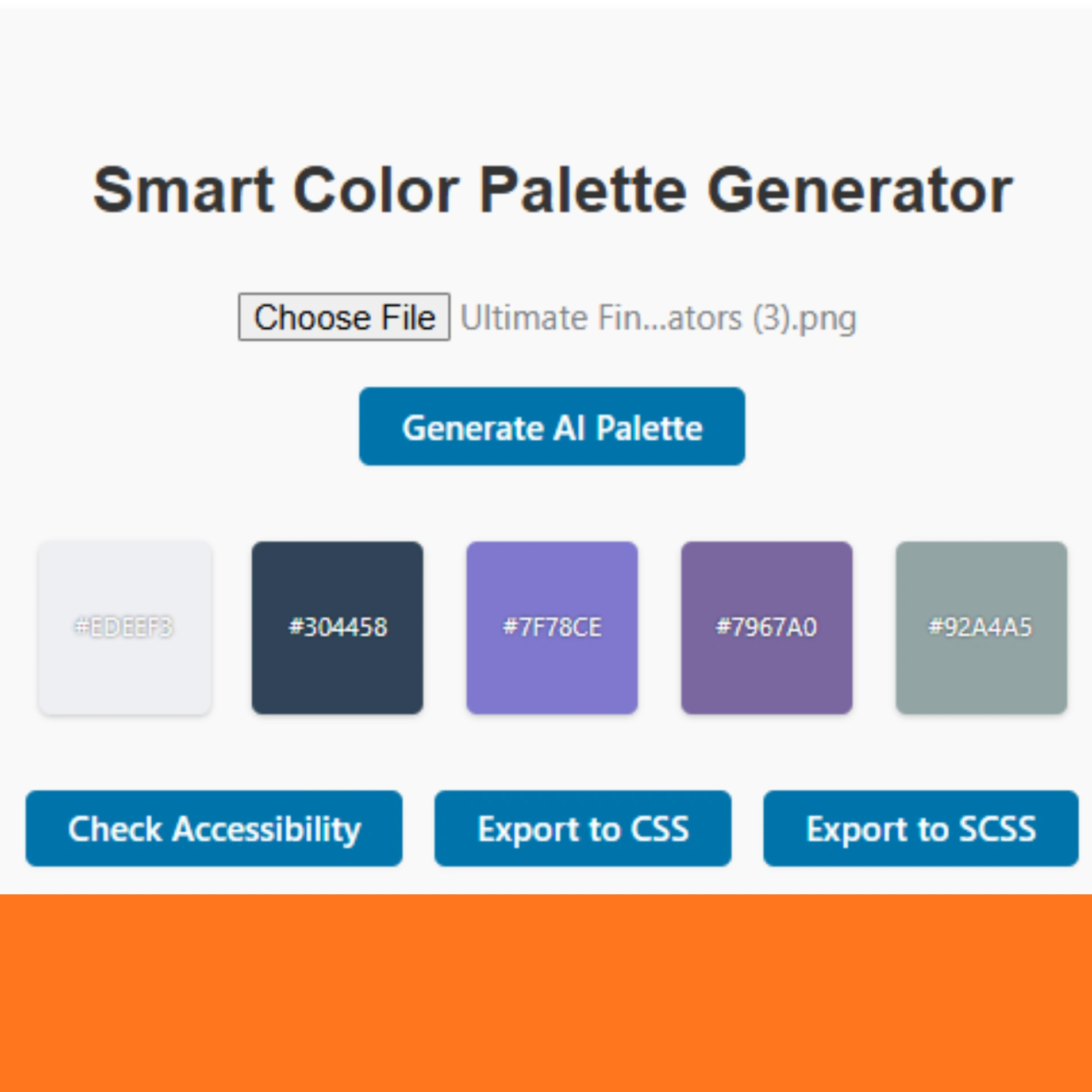

It is a cutting-edge Smart Color Palette Generator plugin for WordPress. It automatically creates stunning color schemes from uploaded images or AI-based suggestions. Perfect for WooCommerce store owners, it extracts dominant colors, ensures WCAG accessibility compliance, and lets you export palettes to CSS/SCSS/JSON/PDF. No coding is required – simply drop the shortcode on any page and start crafting on-brand color palettes in seconds. This powerful yet user-friendly tool brings futuristic AI-driven color harmony to your site.
Key Features of (Smart Color Palette Generator)
-
Image-Based Palette Extraction: Upload any photo and instantly extract its dominant colors into a cohesive palette. The plugin uses the ColorThief library to analyze the image and pull out up to N colors (set by an easy slider).
-
AI-Powered Color Harmony: Choose a base color and a harmony type (complementary, analogous, triadic, tetradic, or monochromatic), and the plugin generates a beautiful palette with just one click. You’ll get AI-suggested color harmonies automatically.
-
WCAG Accessibility Check: Every generated palette is checked for contrast compliance. The tool displays which color pairs meet WCAG contrast standards, so your site’s colors remain legible and accessible.
-
Flexible Export Options: Once your palette is ready, export it immediately to CSS, SCSS, JSON, or PDF – perfect for developers or designers to integrate. One-click buttons output the palette in your chosen format.
-
Manual Customization: Want finer control? Switch to the Manual tab and click any color swatch to adjust it. The plugin shows each color’s HEX and RGB values in real time, so you can fine-tune or “find color codes” effortlessly.
-
Responsive, Intuitive UI: The fully-responsive drag-and-drop interface (built with modern CSS/FontAwesome) ensures the tool looks great on mobile and desktop. No complicated setup – anyone can generate professional palettes in minutes.
How to Use Smart Color Palette Generator on Your WooCommerce Site

Using this plugin is as simple as adding a shortcode to your content. In any page or product description, insert:
[]
This will display the full Smart Color Palette Generator interface. From there, users (or you) can drag & drop an image, set “Number of Colors” with the slider, and click Extract Colors to generate a palette instantly. You can also switch to AI Suggestions, pick a base color and harmony style, and hit Generate AI Palette for instant color schemes. Finally, view the palette below, adjust any swatch manually, or export it with the provided buttons.
For example, on a WooCommerce product page for a t-shirt, adding the shortcode means customers or designers can experiment with brand colors by uploading a logo or photo and grabbing matching HEX codes. It’s a no-code, no-delay way to engage visitors with an interactive color tool. The plugin’s settings allow up to 8 colors by default, but you can change max_colors=8 in the shortcode if needed.
Why Choose (Smart Color Palette Generator)?
stands out from other color tools and plugins. Many basic palette makers or color pickers are static or require manual color picking. In contrast, this plugin uses advanced algorithms under the hood (via ColorThief) to do the hard work – automatically extracting image palettes and computing harmonic color schemes. It’s like having an AI design assistant built into your WordPress site.
-
No More Guesswork: Instead of trying to “identify color patterns” by eye, simply use the plugin. It even copies color codes for you with a click.
-
Trusted, Fast Results: The code is optimized for speed, and the live preview updates instantly. Performance is smooth, so visitors won’t be slowed down.
-
Versatile: Whether you run a design studio, blog, or shop, Smart Color Palette Generator adapts. It helps create consistent branding (find color codes for your brand) and improves user trust through an accessible design.
-
Lifetime License (Free Updates): Pay once (₹199) and get lifetime updates and support. No recurring fees or hidden charges. Use it on unlimited websites – we’ll even email you the latest version when it’s updated.
Compared to standalone palette websites, this plugin keeps everything on your site. And unlike many free plugins, it includes premium features like AI-suggested harmonies and multi-format exports. These magic features mean you can produce professional-grade color schemes that help products and content stand out – boosting sales and user engagement.
3 Easy Steps to Beautiful Palettes
-
Install & Activate: Add the plugin to your WordPress site and activate it. There’s no confusing setup.
-
Insert Shortcode: Edit your product page or post and paste
[color_palette_generator]where you want the tool to appear. -
Generate & Export: Upload an image or pick an AI scheme, then click Extract or Generate AI Palette. Preview the results, copy any color code you like, or export the full palette.
That’s it! In just minutes, you’ll have a stunning color palette ready for use in your design or theme.
Download, Pricing & Support

Smart Color Palette Generator is available for a one-time fee of ₹199. This purchase gives you a lifetime license with free future updates, direct email support, and unlimited site usage. You can download the plugin immediately after purchase and start using it on all your WordPress sites.
-
Download Now: Instantly download the plugin and use it on unlimited sites.
-
Lifetime Access: Includes all future updates (no extra charges).
-
Easy Setup: The plugin comes ready to use – just follow the guide above.
To get your copy, visit our store: toolsell.online/shop. This tool is designed to make your life easier, so don’t settle for outdated color tools. Invest ₹199 in Smart Color Palette Generator today and transform how you create and manage color schemes. Your site’s design will thank you!
About Toolsell: Created by P. Adhil Khan, this Smart Color Palette Generator is part of the Toolsell plugin collection. It’s rigorously tested and designed to boost your WooCommerce site’s appeal. Give it a try and see the difference professional, AI-powered color design can make for your business.
Happy designing! Feel free to explore related tools on our WooCommerce plugin shop for more ways to enhance your site.
The related website is here


Reviews
There are no reviews yet.